Slite is a popular tool for internal documentation and team notes. Many teams use it as a shared knowledge base, a place for meeting notes, and a lightweight internal wiki.
That said, it does not work equally well for everyone. Some teams run into issues once their workspace grows, others want more structure, stronger search, or better ways to connect documentation with daily work.
What are the limitations of Slite?
Slite works well for small teams that want a simple place to write and share notes. As the amount of content grows, some teams start to notice rough edges.
- Some users find the interface of Slite unintuitive and clunky (source)
- Slite lacks project management capabilities, such as task assignments (source)
- Some users find it challenging to manage large amounts of content in Slite (source)
If you are looking for a Slite alternative, you usually want one of three things. A cleaner wiki, a proper knowledge base, or a workspace that also handles projects and planning. This guide covers tools across all three categories so you can find one that actually fits how your team works.
What to look for in a Slite alternative
Most teams start with Slite because it feels simple and easy to use. Over time, the requirements often change. Before picking a replacement, it helps to be clear about what actually matters for your workflow.
- Content structure: Some tools feel fine with a few dozen pages but fall apart once your workspace grows. Check how the tool handles hierarchy, linking, and navigation at scale.
- Search quality: A knowledge base only works if people can actually find things. Look for fast, accurate search that does not depend on exact phrasing.
- Access control: As your team grows, you may need private areas, read-only spaces, or limited editing rights. Not every tool handles this well.
- Workflow fit: Decide whether you only need a wiki or if documentation should live alongside tasks, planning, and discussions.
- Publishing options: If you plan to share docs with customers or partners, check how easy it is to make content public and searchable.
Best Slite competitors by use case
Not every Slite replacement solves the same problem. Some tools focus on internal wikis. Others work better as knowledge bases or all-in-one workspaces.
- Docs + project management in one place: Nuclino, Notion, ClickUp
- Fast internal wiki for small teams: Slab
- Knowledge base with governance and review workflows: Document360, Guru
- Developer-facing docs: GitBook
- Google Docs-based wiki layer: You Need A Wiki
- Enterprise wiki that plugs into Jira: Confluence
9 best Slite alternatives
To make your decision easier, we've put together a list of the 6 best Slite alternatives and competitors, based on real reviews. As is the case with most things, there is no one-size-fits-all option here. Each one of these tools comes with its own strengths, design decisions, and feature sets, and the best solution depends on your unique requirements and preferences.
Check out the Slite alternatives below and find the one that best suits your team's needs.
1. Nuclino
- Pricing: Free, advanced features starting from $6/user/month
- Rating on Capterra: 4.7/5
- Best for: Internal docs, lightweight projects, and visual collaboration in one workspace
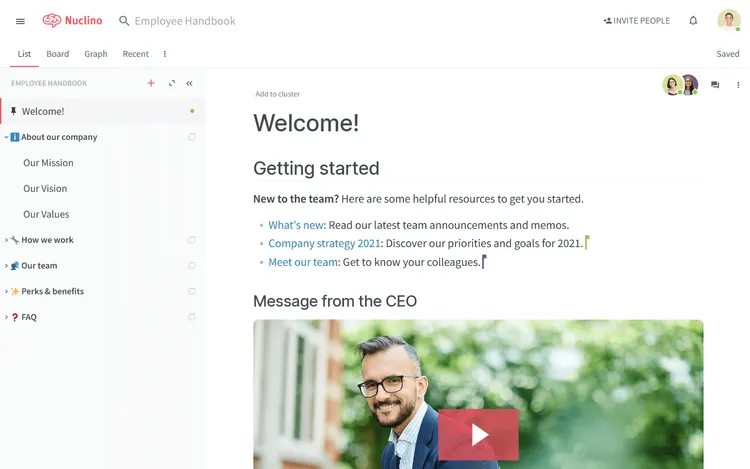
Like Slite, Nuclino allows you to set up your private wiki or internal knowledge base, create an employee handbook, collaborate on docs and meeting notes, and more. However, Nuclino is much more than a document collaboration tool — it's a unified workspace where you can bring together all of your team's work.
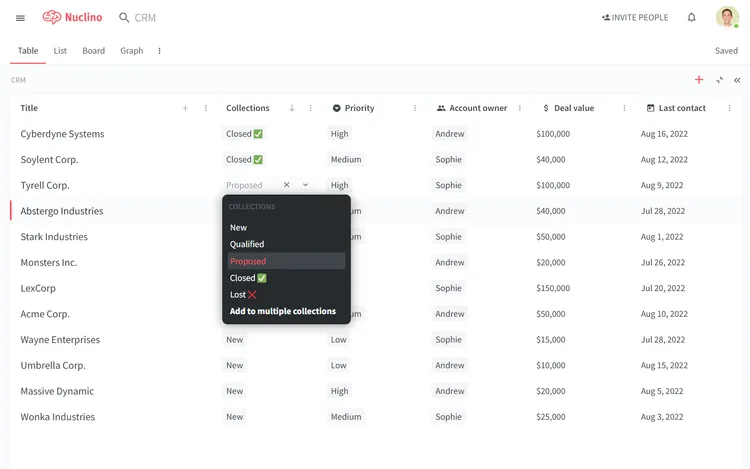
In addition to being able to organize your docs in a nested list, Nuclino allows you to visualize your work in a Kanban board, a table, or a mindmap-style graph. This makes Nuclino a great solution for a much wider range of use cases, including sprint planning, project management, issue tracking, and many more.
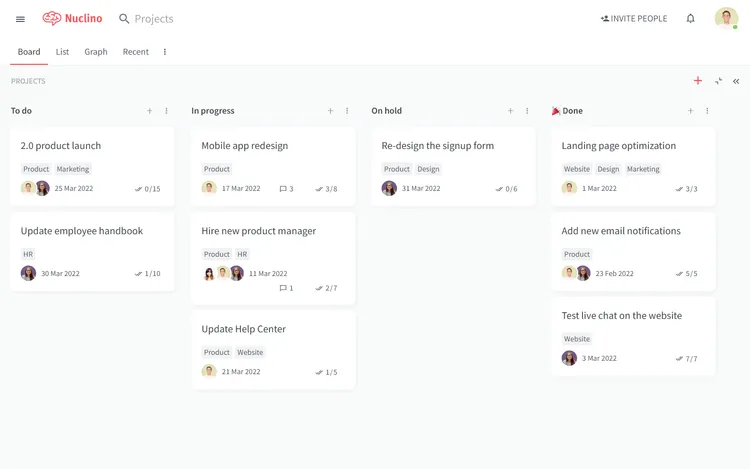
Every item in Nuclino can be collaborated on, both in real time and asynchronously, with the help of mentions and comments. Every change is automatically preserved in the version history, allowing you to restore earlier versions of your documents if necessary. Related items can be easily linked together using internal links.
Like Slite, Nuclino comes with an AI-powered assistant. Sidekick can instantly answer any question based on your content, brainstorm ideas, create first drafts, generate images, summarize long documents, and more.
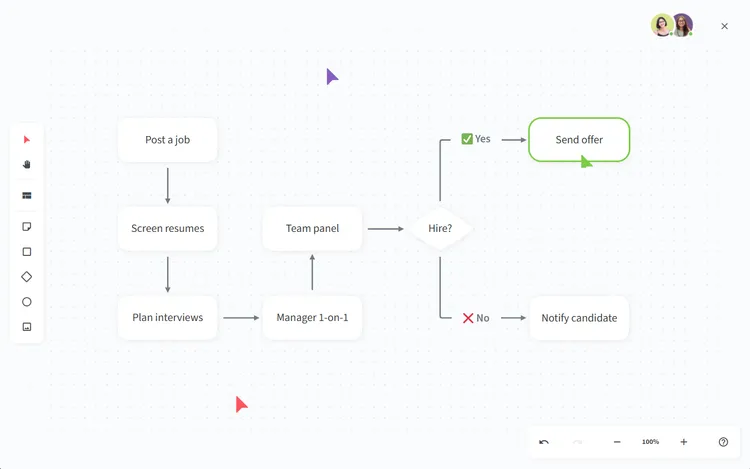
Nuclino offers built-in visual collaboration and allows you to add an infinite collaborative canvas to any page. You can use it to create diagrams and flowcharts, organize ideas using sticky notes, build moodboards, and much more.
You can also turn any Nuclino workspace into a public website, accessible to anyone on the web and discoverable via search engines. It's perfect for help centers, user documentation, changelogs, and much more.

What really makes Nuclino stand out as an alternative to Slite is its clean, distraction-free interface, intuitive navigation, and unparalleled speed. It focuses on the essential functionality, such as search, content organization, and collaborative editing, and minimizes the learning curve for new users.
What users say about Nuclino:
"Nuclino has an extremely intuitive user interface. New users can get spooled up extraordinarily quickly and start contributing immediately. It's also extremely clean and able to accommodate varying levels of hierarchy very well. It allows for live collaborative editing of the pages, which is a huge convenience for teams that have multiple people working on the same project."
2. Notion
- Pricing: Free, advanced features starting from $10/user/month
- Rating on Capterra: 4.7/5
- Best for: Combining docs, databases, and lightweight project tracking
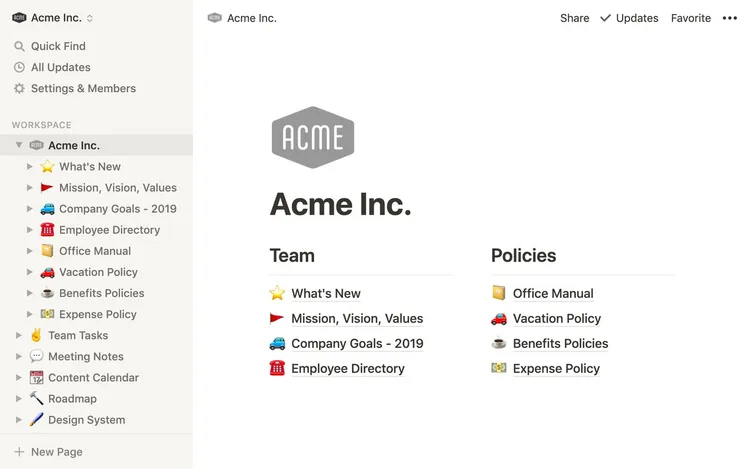
Notion is a flexible workspace that combines docs, databases, and lightweight task tracking in one place. Many teams use it as an internal wiki, but it can also handle roadmaps, content planning, and simple project tracking.
Compared to Slite, Notion gives you more control over how content is structured. Pages can behave like documents, tables, or mini apps, which makes it easier to organize larger amounts of information. This flexibility is useful, but it can also mean more setup work.
Notion works well for teams that want to build their own system rather than follow a fixed structure. If you like customizing layouts and workflows, it is worth a look.
Learn more about how Notion compares to Slite: Slite vs Notion.
Looking for more tools similar to Notion? Check out this list of Notion alternatives.
What users say about Notion:
"It wasn't easy to keep everything organized within Slite, and once the team grew beyond ten members, we noticed that it was incredibly unsustainable with a growing team. Notion allowed us to make our management and organization more flexible!"
3. ClickUp
- Pricing: Free, advanced features starting from $7/user/month
- Rating on Capterra: 4.6/5
- Best for: Connecting documentation directly to tasks and projects
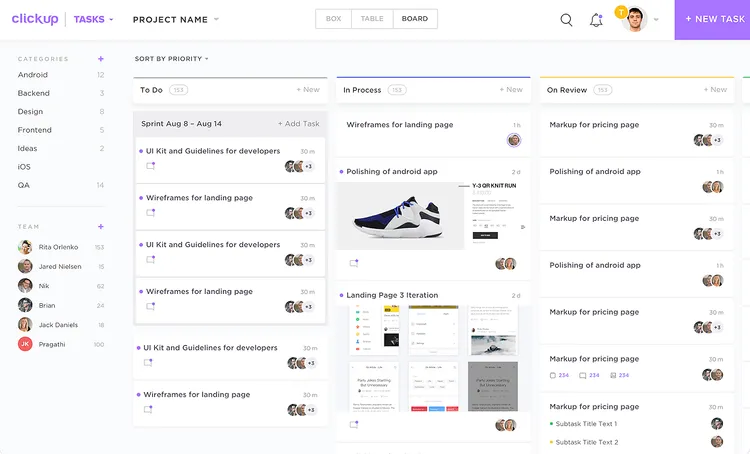
ClickUp is primarily known as a project management tool, but it also includes built-in docs and wiki features. Teams often look at ClickUp as a Slite alternative when documentation needs to live closer to tasks, projects, and day-to-day execution.
ClickUp Docs let teams write and organize internal documentation, link pages to tasks, and collaborate in real time. This can work well for teams that already manage their work in ClickUp and want to avoid switching between tools.
Because ClickUp covers a wide range of functionality, it can feel busy at first. Teams that already rely on it for project tracking usually find the documentation features easier to adopt.
Looking for more tools similar to ClickUp? Check out this list of ClickUp alternatives.
What users say about ClickUp:
"At my previous work position I used Notion to collaborate with team members and while their docs are pretty configurable we ran into issues setting up complex boards and task lists. ClickUp supports nearly anything you can imagine with flexible configuration, content types and views. No restrictions are in place regarding how to use the tool."
4. Slab
- Pricing: Free, advanced features starting from $6.67/user/month
- Rating on Capterra: 4.8/5
- Best for: A clean, straightforward internal wiki
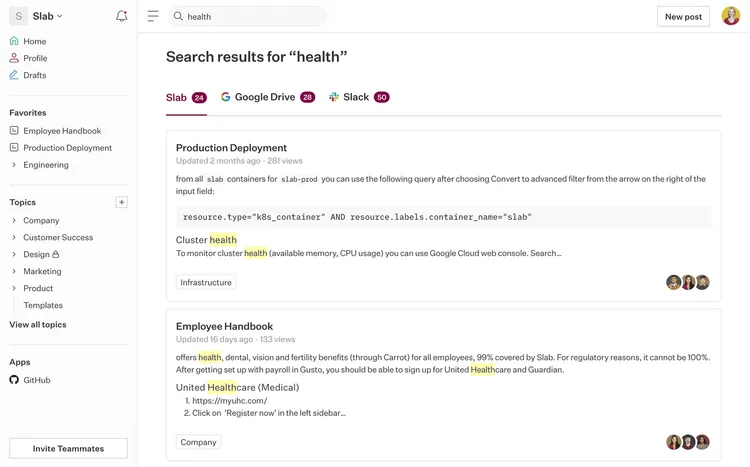
Slab is an internal knowledge base tool built around simplicity. It focuses on writing, organizing, and finding internal content without a lot of extra features.
The editor feels clean and easy to use, and the navigation stays simple even as your workspace grows. Slab also integrates with tools like Slack and Google Drive, which helps teams surface content where they already work.
If you like Slite but want a slightly more structured wiki experience, Slab can feel like a natural next step.
Learn more about how Slab compares to Slite: Slite vs Slab.
Looking for more tools similar to Slab? Check out this list of Slab alternatives.
What users say about Slab:
"Excellent alternative for creating a wiki or corporate knowledge base. It is the tool that I selected to create the knowledge base of the research team to which I belong. We have been using it since the beginning of 2020. Very useful for academic or business use."
5. Document360
- Pricing: Available on request
- Rating on Capterra: 4.7/5
- Best for: Structured knowledge bases with publishing and review workflows
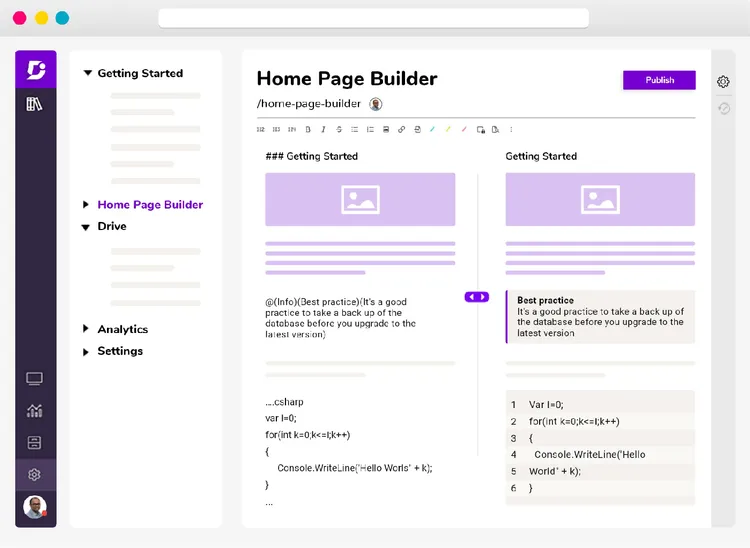
If you find the feature set of Slite to be too limited and are looking for a more flexible alternative, Document360 may be an option worth considering. It allows you to set up a fully custom knowledge base, including your brand colors, custom sub-domain, custom header and footer navigation, and so on.
While Slite is a multi-purpose team collaboration and communication tool, Document360 is primarily designed to serve as a knowledge sharing platform for your employees or customers. It lacks some of the collaborative features of Slite, but instead it's fully optimized for the use case of knowledge management.
Notable features of Document360 include built-in localization mechanisms, content review reminders, SEO features, detailed analytics, and more.
Looking for more tools similar to Document360? Check out this list of Document360 alternatives.
What users say about Document360:
"To assist our partner organization, we create and compile a large number of evidence-based tools and materials. They were all saved in Google Docs and stored on Google Drive. We were able to gather together a big amount of information and documents in a very orderly manner thanks to Document360. We wanted to make it easy for our partner staff to access relevant resources for a topic of interest, and Document360 enabled us in designing an organized and user-friendly resource library."
6. Guru
- Pricing: Free, advanced features starting from $25/user/month
- Rating on Capterra: 4.8/5
- Best for: Quick access to short, verified answers in sales and support workflows
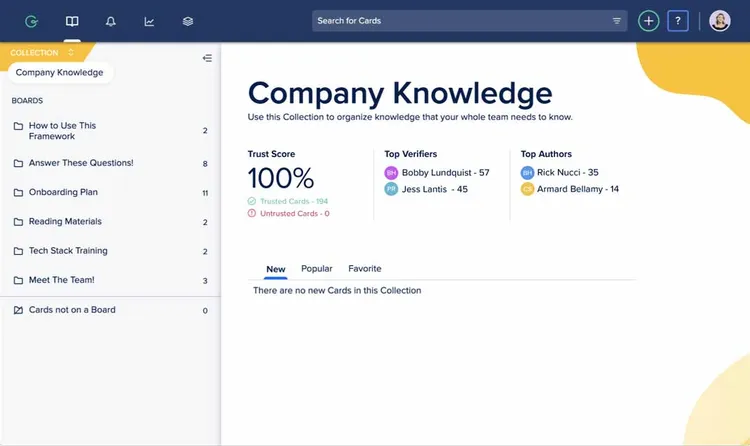
Guru positions itself as a knowledge management tool rather than a simple documentation space. It focuses on delivering the right information at the right time, often through browser extensions and in-app widgets.
Unlike Slite, Guru does not center around a traditional page hierarchy. It uses a card-based system that works well for short, practical answers. This suits teams that need quick access to verified information, such as sales or support teams.
Guru also includes content verification workflows, which help keep information up to date. If accuracy and quick access matter more than long-form documentation, Guru can be a good alternative.
Looking for more tools similar to Guru? Check out this list of Guru alternatives.
What users say about Guru:
"We use Guru as a tool to support our sales team with the idea of them being able to self-serve and find the right pieces of information. It is a fairly intuitive product to use and build on top of. We also integrated Guru into our Slack instance and urge our sales team to go through Guru before asking a human. I don't dislike Guru, but have noticed that with any KMS you need to have constant upkeep to ensure the quality of the information stored is good. Additionally, it's not enough to just maintain the knowledge, people need to be dilegent about adding to it."
7. Confluence
- Pricing: Free, advanced features starting from $5/user/month
- Rating on Capterra: 4.5/5
- Best for: Larger organizations already using Jira and other Atlassian tools
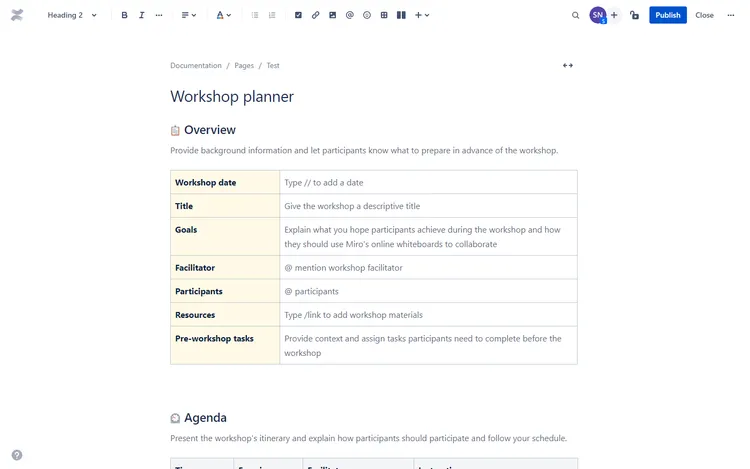
If you are working at a large company and dealing with large amounts of content, Atlassian Confluence may be a great alternative.
Confluence is one of the oldest document management platforms on the market with over 60,000 customers worldwide, including many Fortune 500 companies. Its feature set is very extensive, and includes a wide range of enterprise features. An additional benefit is its seamless integration with other products in the Atlassian suite. If you are already using other Atlassian tools, such as Jira or Bitbucket, Confluence is likely to easily fit into your workflow.
Confluence does come with a certain learning curve, but if you are looking for a Slite alternative with advanced customization options and enterprise-level features, this may be a reasonable trade-off.
Learn more about how Confluence compares to Slite: Confluence vs Slite.
Looking for more tools similar to Confluence? Check out this list of Confluence alternatives.
What users say about Confluence:
"We document everything in Confluence. I run a digital marketing team of around 20 people and have a total of 40 users in the tool (a few other teams besides mine use it). It's been a fantastic tool to get everyone on the same page and keep track of our how-tos, meeting notes, plans, goals, features/specs, etc."
8. You Need A Wiki
- Pricing: Free for 1 user, team plans starting from $10/month
- Rating on Capterra: Not rated yet
- Best for: Turning Google Docs into a browsable internal wiki
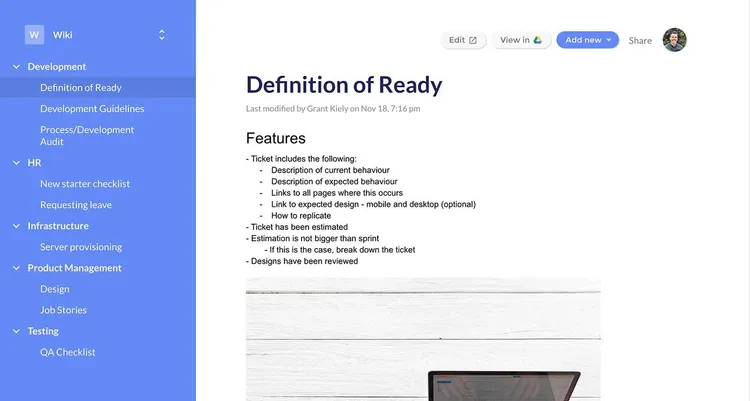
If your team likes the familiar feel of Google Docs, You Need a Wiki may be the best Slite alternative for you. It's a simple tool that allows you to easily build a full-fledged business wiki on top of your existing Google Docs.
You Need A Wiki is a wiki tool that brings together the easy navigation of Slite and the advanced content editor of Google Docs. If you find Slite too limited in terms of formatting features and layout options, YNAW is definitely worth a try.
The generous pricing model of YNAW is another reason to consider it as a Slite alternative. YNAW is significantly more affordable than Slite, offering relatively cheap flat pricing tiers instead of per-user fees that can quickly add up as your team grows.
What users say about You Need A Wiki:
"There are a lot of wiki tools out there. If your organization uses Google Drive, check out YNAW. Easy to setup, uses the tools you already have. It converts the Docs in Drive into a beautiful wiki."
9. GitBook
- Pricing: Free, advanced features starting from $65/site/month + $12/user/month
- Rating on Capterra: 4.5/5
- Best for: Product, API, and developer documentation
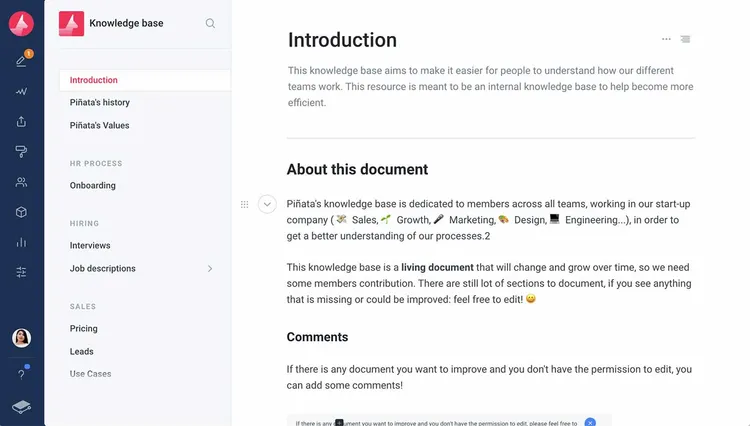
GitBook is a Slite alternative designed first and foremost for software development teams. While GitBook lacks certain collaboration features, such as real-time collaborative editing, it performs strongly in other areas. This documentation tool is packed with features developers can appreciate, including Markdown commands, GitHub sync, version control with branches, and more.
GitBook can be a great tool for a wide range of use cases, including product docs, knowledge bases, API docs, open source projects, and more.
Looking for more tools similar to GitBook? Check out this list of GitBook alternatives.
What users say about GitBook:
"Before Gitbook our documentation was limited and very hard to find. It is really easy to get started with and the best part is that it supports Markdown. Writing documentation in Markdown is way easier and Gitbook makes it easy to organize the content. There are no cons as such but there were few issues while getting started, while importing the existing documentation for the first time."
— Capterra
How to choose the best Slite alternative
There is no universal replacement for Slite. Each tool on this list takes a different approach to documentation, collaboration, and structure.
Some teams want a lightweight wiki that stays out of the way. Others need a proper knowledge base with review workflows and publishing. Some prefer one system that also handles planning and tasks.
The best way to decide is to start with your main problem. Is it search, structure, permissions, or workflow? Once that is clear, the right option usually becomes obvious.